


USB Radio


Joined: 03-13-2012
Posts: 3
From: New Albany, OH
USB radio info
Hi axxsys,
Have you replaced your radio with the USB model yet? That's exactly what I plan to do as well. I emailed my local Chevy parts department today and the guy gave me the part number (20940644), but said he couldn't guarantee it would work because it's not available as an accessory, only a part. I asked him what that means but haven't received a reply yet. If you've been successful with the transplant, I'd love to hear your story.
Chris
Have you replaced your radio with the USB model yet? That's exactly what I plan to do as well. I emailed my local Chevy parts department today and the guy gave me the part number (20940644), but said he couldn't guarantee it would work because it's not available as an accessory, only a part. I asked him what that means but haven't received a reply yet. If you've been successful with the transplant, I'd love to hear your story.
Chris

Senior Member
Joined: 06-05-2007
Posts: 238
From: Houston
kreesto,
Ive put 2 USB OEM radios in my 07 and 08 models.
If you buy the radio new it should pair the vin when you 1st install it and it will work normally.
If you buy a used one it will be locked (Anit-theft) and you will have to take it to a dealership to have a "Vin relearn" done with the tech II tool to get it turned back on.
Also Youll need to give the radio part number to the dealer when unlocking.
When I put the 2010 USB radio in my 08 LS the 2010 p/n was not available in the list on the scanner. Because the USB radio was never an option for 08. So we choose a diffent p/n 25964501 from the list and it worked fine.
Ive put 2 USB OEM radios in my 07 and 08 models.
If you buy the radio new it should pair the vin when you 1st install it and it will work normally.
If you buy a used one it will be locked (Anit-theft) and you will have to take it to a dealership to have a "Vin relearn" done with the tech II tool to get it turned back on.
Also Youll need to give the radio part number to the dealer when unlocking.
When I put the 2010 USB radio in my 08 LS the 2010 p/n was not available in the list on the scanner. Because the USB radio was never an option for 08. So we choose a diffent p/n 25964501 from the list and it worked fine.
Last edited by Pretzel; Mar 15, 2012 at 12:48 AM.


Senior Member
Joined: 03-01-2010
Posts: 121
From: Texas
Pretzel-Just wondering if you have had any dropouts on the USB port?
I have posted previous problems with mine not working for short periods of time. It has been working fine for about a month or so.
Also do you use thumb drives or an IPod. If you use an IPod does it take precedent when controlling the order of the music or how you shuffle or don't shuffle or play entire cds or does the in dash radio become the default controller?
Kreesto-Be aware that the GM shuffle mode does not do a very good job. I use thumb drives and grab each cds music to a folder on my pc and then transfer it to a thumb drive all at once and then you can listen to all the songs without a repeat. You can go here and see the type I use so it doesn't stick out on the dash.
I have posted previous problems with mine not working for short periods of time. It has been working fine for about a month or so.
Also do you use thumb drives or an IPod. If you use an IPod does it take precedent when controlling the order of the music or how you shuffle or don't shuffle or play entire cds or does the in dash radio become the default controller?
Kreesto-Be aware that the GM shuffle mode does not do a very good job. I use thumb drives and grab each cds music to a folder on my pc and then transfer it to a thumb drive all at once and then you can listen to all the songs without a repeat. You can go here and see the type I use so it doesn't stick out on the dash.
Senior Member
Joined: 06-05-2007
Posts: 238
From: Houston
Deke40,
Ive only had one act up for a day then it started working again.
I use only the 16gb Pico mini (thumb drives) in mine. I leave them in. They work flawlessly and hold a boat load of music :) I also grind off the landyard ring for a lower profile.
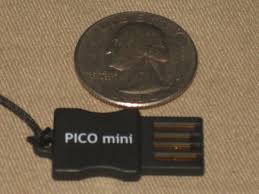
Ive only had one act up for a day then it started working again.
I use only the 16gb Pico mini (thumb drives) in mine. I leave them in. They work flawlessly and hold a boat load of music :) I also grind off the landyard ring for a lower profile.