


GPS Navigation Systems


Senior Member
Joined: 06-18-2006
Posts: 839
From: Hillcrest, San Diego, CA
Well, i decided to take my chances with the LAW, and keep it mounted on the windshield up high next to the rearview mirror.... once the novelty wears off, i'm sure i'll be taking it down and only using it when necessary.....

Senior Member
Joined: 04-19-2006
Posts: 417
From: Gallatin, TN
Some comments...
Stevflo: You can add in a lot of things that you want, like
local eateries, local attractions, etc.
This way you do not need to search or need an address to "pull 'em up".
For instance, my Nashville file points you to the closest one when doing
a tour of Nashville.
I also have Family and friends file so we don't have to look up anything,
just select and GO! And having the phone number comes in handy,
if it's not in your cell phone already....
By default the GPS finds the 50 closest items to your moving or current location.
Otherwise, you can use a POI file to more explicit.
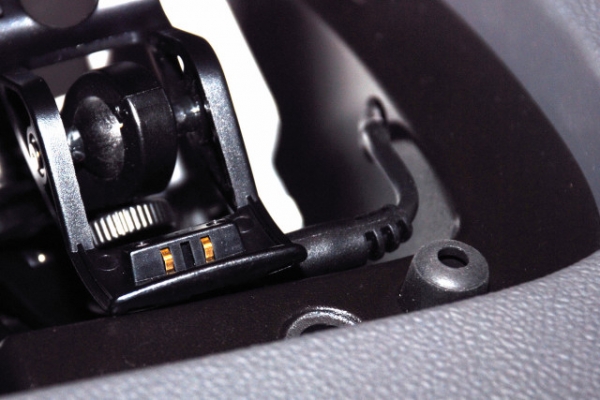
HVROD: For our Garmin C330, I made small hole for the power
cord in the box's edge, then ran the cable down inside the dash
and out the bottom to the ciggie lighter. Then we just take it off the
stand and close the lid. WAY COOL!!!! Out of sight, out of Mind!
I will try to post a pic later tonight, after work...
I luv our HHR and now with onboard GPS, OMG, how cool!!!!
PLEASE go to http://www.poi-factory.com/node/192 for my Nashville poi file.
The "POI-Factory" has tons of GPS stuff there and even directions and
how to's for making and loading your very own POI files.
And feel free to PM me or E-Mail if ya get stuck....


Stevflo: You can add in a lot of things that you want, like
local eateries, local attractions, etc.
This way you do not need to search or need an address to "pull 'em up".
For instance, my Nashville file points you to the closest one when doing
a tour of Nashville.
I also have Family and friends file so we don't have to look up anything,
just select and GO! And having the phone number comes in handy,
if it's not in your cell phone already....
By default the GPS finds the 50 closest items to your moving or current location.
Otherwise, you can use a POI file to more explicit.
HVROD: For our Garmin C330, I made small hole for the power
cord in the box's edge, then ran the cable down inside the dash
and out the bottom to the ciggie lighter. Then we just take it off the
stand and close the lid. WAY COOL!!!! Out of sight, out of Mind!
I will try to post a pic later tonight, after work...
I luv our HHR and now with onboard GPS, OMG, how cool!!!!
PLEASE go to http://www.poi-factory.com/node/192 for my Nashville poi file.
The "POI-Factory" has tons of GPS stuff there and even directions and
how to's for making and loading your very own POI files.
And feel free to PM me or E-Mail if ya get stuck....

Senior Member
Joined: 12-21-2005
Posts: 1,010
From: Launch Coast Calif.
Originally Posted by galladanb
Some comments...
Stevflo: You can add in a lot of things that you want, like
local eateries, local attractions, etc.
This way you do not need to search or need an address to "pull 'em up".
For instance, my Nashville file points you to the closest one when doing
a tour of Nashville.
I also have Family and friends file so we don't have to look up anything,
just select and GO! And having the phone number comes in handy,
if it's not in your cell phone already....
By default the GPS finds the 50 closest items to your moving or current location.
Otherwise, you can use a POI file to more explicit.
HVROD: For our Garmin C330, I made small hole for the power
cord in the box's edge, then ran the cable down inside the dash
and out the bottom to the ciggie lighter. Then we just take it off the
stand and close the lid. WAY COOL!!!! Out of sight, out of Mind!
I will try to post a pic later tonight, after work...
I luv our HHR and now with onboard GPS, OMG, how cool!!!!
PLEASE go to http://www.poi-factory.com/node/192 for my Nashville poi file.
The "POI-Factory" has tons of GPS stuff there and even directions and
how to's for making and loading your very own POI files.
And feel free to PM me or E-Mail if ya get stuck....
Stevflo: You can add in a lot of things that you want, like
local eateries, local attractions, etc.
This way you do not need to search or need an address to "pull 'em up".
For instance, my Nashville file points you to the closest one when doing
a tour of Nashville.
I also have Family and friends file so we don't have to look up anything,
just select and GO! And having the phone number comes in handy,
if it's not in your cell phone already....
By default the GPS finds the 50 closest items to your moving or current location.
Otherwise, you can use a POI file to more explicit.
HVROD: For our Garmin C330, I made small hole for the power
cord in the box's edge, then ran the cable down inside the dash
and out the bottom to the ciggie lighter. Then we just take it off the
stand and close the lid. WAY COOL!!!! Out of sight, out of Mind!
I will try to post a pic later tonight, after work...
I luv our HHR and now with onboard GPS, OMG, how cool!!!!
PLEASE go to http://www.poi-factory.com/node/192 for my Nashville poi file.
The "POI-Factory" has tons of GPS stuff there and even directions and
how to's for making and loading your very own POI files.
And feel free to PM me or E-Mail if ya get stuck....
Good job..
When I mounted my Digital Volt meter over the power connection in the dash..
I placed the power connection inside the compartment also.. its position vertical in the tray , farthest back, to allow compartment cover to close properly and still allow items to be placed in the compartment...
Senior Member
Joined: 04-19-2006
Posts: 417
From: Gallatin, TN
Dave,
I think you are going to love the GPS stuff!!!
The C330 is a great choice, but if I had a do-over, I think I would
choose one with text to voice ability, like the nest step up the
C340 or C350...
For instance, I cannot use a guided tour with the girl speaking to me...
and telling me all about that house over there... All in all kinda minor...
Don't get me wrong, the c330 is a very good workhorse and it has
already saved me on a couple of trips, and Sandy, just loves it too!!!
And, I will post installed pics tonight as soon as get home, shoot 'em
and post 'em....
I think you are going to love the GPS stuff!!!
The C330 is a great choice, but if I had a do-over, I think I would
choose one with text to voice ability, like the nest step up the
C340 or C350...
For instance, I cannot use a guided tour with the girl speaking to me...
and telling me all about that house over there... All in all kinda minor...
Don't get me wrong, the c330 is a very good workhorse and it has
already saved me on a couple of trips, and Sandy, just loves it too!!!
And, I will post installed pics tonight as soon as get home, shoot 'em
and post 'em....
Senior Member
Joined: 04-19-2006
Posts: 417
From: Gallatin, TN
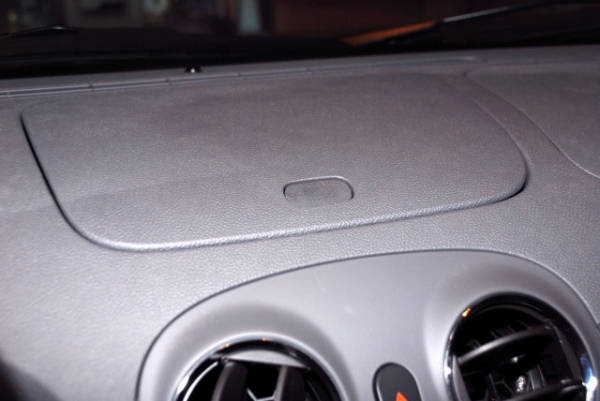
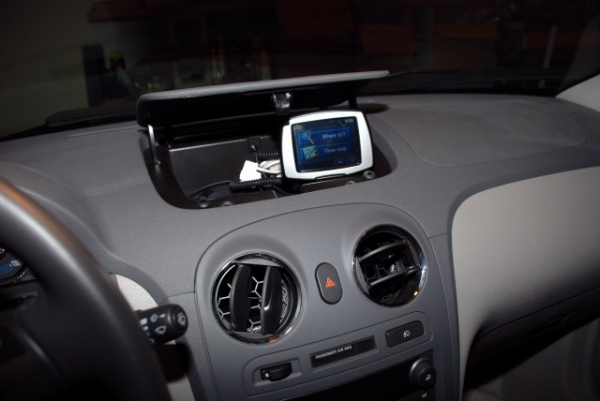
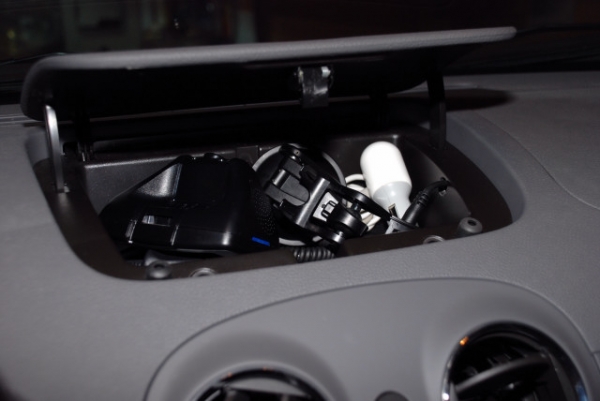
GPS installation pics...
Here is the first one, with the box closed,
The Second one, Showing the GPS in drive position,
The Third one, Showing the stowed chaos,
The Fourth one, Showing the cable detail,
The Second one, Showing the GPS in drive position,
The Third one, Showing the stowed chaos,
The Fourth one, Showing the cable detail,
Senior Member
Joined: 04-19-2006
Posts: 417
From: Gallatin, TN
Dave,
Yea, I went out and bought a external ant, thinking I would need one.
But took it back...
Reception is wonderful so far, no loss of signal...
HOW Cool is it to have a GPS nav anyway!!!!
BTW, if ya need help setting up a POI file for yours, let me know...
Yea, I went out and bought a external ant, thinking I would need one.
But took it back...
Reception is wonderful so far, no loss of signal...
HOW Cool is it to have a GPS nav anyway!!!!
BTW, if ya need help setting up a POI file for yours, let me know...

New Member
Joined: 03-22-2006
Posts: 22
From: South Jersey
Using the Tom Tom in Spain
I used a Tom Tom unit in Spain in October when I went to my cousins wedding in La coruna, it was the greatest thing since sliced bread as it talked me back and forth from my Hotel to various points around the countryside. what a difference between my last trip when I couldn't read a lot of the signs and stayed lost.

Senior Member
Joined: 02-19-2006
Posts: 473
From: Kentucky
Originally Posted by galladanb
Dave,
BTW, if ya need help setting up a POI file for yours, let me know...
BTW, if ya need help setting up a POI file for yours, let me know...