


ipod question


New Member
Joined: 11-26-2006
Posts: 10
From: Warren, MI
What you need, precisely, is a male-to-male 1/8" (or 3.5mm) headphone jack cable. Any MP3 or media player with a small headphone jack or line out will work with the aux input on the HHR.
The only exception are those new fancy mp3 player cell phones, most of which have weird 2.5mm headphone jacks, in which case you'll need an adapter cable.
You shouldn't really spend more that $10 on this cable, they are very cheap to make, and can be found online for a few dollars. Try http://www.cyberguys.com/. The big, fancy cables are more expensive because they use thicker plastic sheathing on the cable, and fancy looking connectors. If that's important to you, then go ahead and drop $25 for it, otherwise it really doesn't make that much of a difference.
The only exception are those new fancy mp3 player cell phones, most of which have weird 2.5mm headphone jacks, in which case you'll need an adapter cable.
You shouldn't really spend more that $10 on this cable, they are very cheap to make, and can be found online for a few dollars. Try http://www.cyberguys.com/. The big, fancy cables are more expensive because they use thicker plastic sheathing on the cable, and fancy looking connectors. If that's important to you, then go ahead and drop $25 for it, otherwise it really doesn't make that much of a difference.

Senior Member
Joined: 04-19-2006
Posts: 417
From: Gallatin, TN
I agree with jbmcb, my cable was found at Radio Shack for under
five bucks.
I also have a radio transmitter, for my work truck, but the reception is
goofy at best and forget about quality...
Many of the preprogrammed stations in the transmitter are already in
use by powerful stations around here, and they just create static...
So a cable in the HHR is absolutly the best way to go.

nJOY!!!
five bucks.
I also have a radio transmitter, for my work truck, but the reception is
goofy at best and forget about quality...
Many of the preprogrammed stations in the transmitter are already in
use by powerful stations around here, and they just create static...
So a cable in the HHR is absolutly the best way to go.
nJOY!!!
Last edited by galladanb; Dec 4, 2006 at 01:35 PM.
Premium Member
Joined: 11-18-2005
Posts: 3,307
From: Naples, FL
Originally Posted by ymerej_mortsdnil
I bought this cable: http://store.apple.com/1-800-MY-APPL...lm=TF367LL%2FA
I believe it is the same one that is in this photo on chevrolet.com: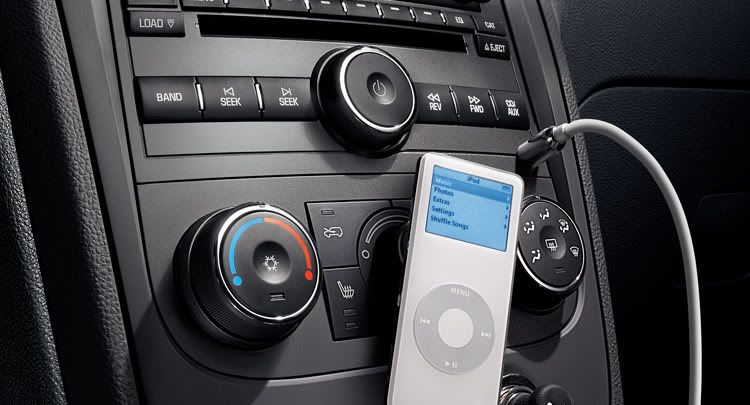
this cable has great sound quality, I would recommend going with this one...hope this helps!
I believe it is the same one that is in this photo on chevrolet.com:
this cable has great sound quality, I would recommend going with this one...hope this helps!

Senior Member
Joined: 05-28-2006
Posts: 314
From: Eastern Kansas
This isn’t about an ipod, but it is related to mp3’s and our HHR’s radios.
I have a single CD radio in mine and i knew that it played cd’s with mp3’s burned on it, but I didn’t know, until I (GASP!!!) read the manual, that it will play CD-R’s (data type, not audio type) with mp3’s on it.
I have my mp3’s backed up as data, in folders, on a data CD just as a double backup for whats on my cumputer. When burning that way, to a data CD instead of an audios CD, you’re not limited to the total time of the songs, but instead to the total size (megabytes) of the songs. basically, 20 some songs vs/ 200+ songs (depending of course on the length of the song.)
What I didn’t know is that my radio/cd player will read and play the data CD’s with the mp3’s in folders. On page 3-68 on my Manual it explains that it can read up to 255 songs, at a max of 18 songs per folder/playlist.
So, the basic difference is that instead of 20 some songs on a CD, now I can have 255 songs per CD. About the same capacity of an ipod shuffle!
If any of this is confusing to those like me, who are sometimes mp3 confused, just let me know and I’ll try to make it more clear.
I have a single CD radio in mine and i knew that it played cd’s with mp3’s burned on it, but I didn’t know, until I (GASP!!!) read the manual, that it will play CD-R’s (data type, not audio type) with mp3’s on it.
I have my mp3’s backed up as data, in folders, on a data CD just as a double backup for whats on my cumputer. When burning that way, to a data CD instead of an audios CD, you’re not limited to the total time of the songs, but instead to the total size (megabytes) of the songs. basically, 20 some songs vs/ 200+ songs (depending of course on the length of the song.)
What I didn’t know is that my radio/cd player will read and play the data CD’s with the mp3’s in folders. On page 3-68 on my Manual it explains that it can read up to 255 songs, at a max of 18 songs per folder/playlist.
So, the basic difference is that instead of 20 some songs on a CD, now I can have 255 songs per CD. About the same capacity of an ipod shuffle!
If any of this is confusing to those like me, who are sometimes mp3 confused, just let me know and I’ll try to make it more clear.
Senior Member
Joined: 05-28-2006
Posts: 314
From: Eastern Kansas
I wanted to add to my post in reference to what the Manual says. On page 3-70 under the title Compressed Audio it makes an important point about uncompressed (regular CD format) and compressed (mp3/WMA format). Press the CAT button, on your radio, to toggle from compressed to uncompressed.
Also on page 3-71, under the title MP3/WMA Format:
the manual talks about playlist extensions. I didn't bother with any extensions and simply burned my MP3's on to CD-R data discs in folders and it worked fine. It read the folders and played all the songs.
I converted my songs to MP3's using a six year old version of iTunes, on my six year old Mac, and burned the CDs using a six year old External CD burner. It didn't appear to need any special file or playlist extensions.
Don't ask me why, cause I dunno.
If it ain't broke, don't fix it.
Also on page 3-71, under the title MP3/WMA Format:
the manual talks about playlist extensions. I didn't bother with any extensions and simply burned my MP3's on to CD-R data discs in folders and it worked fine. It read the folders and played all the songs.
I converted my songs to MP3's using a six year old version of iTunes, on my six year old Mac, and burned the CDs using a six year old External CD burner. It didn't appear to need any special file or playlist extensions.
Don't ask me why, cause I dunno.
If it ain't broke, don't fix it.

Senior Member
Joined: 05-26-2006
Posts: 521
From: Providence, RI
i plugged my laptop into the same jack with the same cable...watched a movie in surround sound...and it was good. Not at all practical, but good.
Its funny to because my ipod pushes my speakers way harder than the head unit alone...I need to swap out these paper cones
Its funny to because my ipod pushes my speakers way harder than the head unit alone...I need to swap out these paper cones
Senior Member
Joined: 04-19-2006
Posts: 417
From: Gallatin, TN
Riverwind,
I agree with all you say.
Here is what I do...
My MP3 data cd's have the artist in a folder, and the songs in the folder.
Example: BEATLES, hold over 66 songs, CSN&Y holds over 45, etc...
Real simple, real neat & tidy...
I try to keep a personal limit of around 120 songs, because at one point,
I thought it blew off the ones over that... But tha's been a while back.
A good tip, burn your data disc on a cd-RW, try it our for a few days,
and if ya like it, burn it to a CD-r. That way you can find typo's or tunes
ya really wanted to have left out, etc...
I always test on a cd-rw for that reason...
I agree with all you say.
Here is what I do...
My MP3 data cd's have the artist in a folder, and the songs in the folder.
Example: BEATLES, hold over 66 songs, CSN&Y holds over 45, etc...
Real simple, real neat & tidy...
I try to keep a personal limit of around 120 songs, because at one point,
I thought it blew off the ones over that... But tha's been a while back.
A good tip, burn your data disc on a cd-RW, try it our for a few days,
and if ya like it, burn it to a CD-r. That way you can find typo's or tunes
ya really wanted to have left out, etc...
I always test on a cd-rw for that reason...

