


My map lights won't turn off!
 08-17-2014, 05:32 PM
#11
Senior Member

Join Date: 10-02-2013
Location: Oklahoma
Posts: 134
OK, this happened to me and after an hour of trying to take fuses off, cursing, etc., I finally RTM and realized that I had moved this knob (inadvertantly  ) all the way to the "right" and this kept the lights on permanently. So once I moved it back to the left some (you'll feel it "unlock"), all was well!
Hopefully this is it!
(yes, I am a dork and went outside and took this pic! )
)
) all the way to the "right" and this kept the lights on permanently. So once I moved it back to the left some (you'll feel it "unlock"), all was well! Hopefully this is it!
(yes, I am a dork and went outside and took this pic!
)
 08-17-2014, 06:35 PM
#12
Deceased
Join Date: 06-30-2010
Location: Kannapolis NC
Posts: 25,739
We had to retire the "Dork Hat" OKIE, it was getting threadbare.
If the budget will allow, maybe we'll order up some bumper stickers.

According to my wife, I should put the first one on my daily driver HHR.
If the budget will allow, maybe we'll order up some bumper stickers.
According to my wife, I should put the first one on my daily driver HHR.
08-27-2014, 11:26 AM
#13

Join Date: 02-06-2011
Location: midwest
Posts: 8
Relatively new to the forum, but happy to see it!
I am currently having a similar issue, HOWEVER, I've had my '08 HHR for over 3 years and was well aware that the dimmer switch also switched on the cabin lights. That switch was the first thing I tried. No luck. As of a couple days ago, my rearview mirror map lights stay on when the car is on, including when I'm driving, and only shut off about 20 minutes or so after the car is completely shut down and locked up. The dimmer switch is working just fine regarding the dash lights, however seems to not be affecting the map lights. I have also tried the map light switches on the rearview mirror and they seem to do nothing. I fear that I may have a short somewhere...
I am currently having a similar issue, HOWEVER, I've had my '08 HHR for over 3 years and was well aware that the dimmer switch also switched on the cabin lights. That switch was the first thing I tried. No luck. As of a couple days ago, my rearview mirror map lights stay on when the car is on, including when I'm driving, and only shut off about 20 minutes or so after the car is completely shut down and locked up. The dimmer switch is working just fine regarding the dash lights, however seems to not be affecting the map lights. I have also tried the map light switches on the rearview mirror and they seem to do nothing. I fear that I may have a short somewhere...
08-28-2014, 10:04 AM
#15
Senior Member

Join Date: 11-05-2010
Location: Detroit, Michigan USA
Posts: 1,492
Relatively new to the forum, but happy to see it!
I am currently having a similar issue, HOWEVER, I've had my '08 HHR for over 3 years and was well aware that the dimmer switch also switched on the cabin lights. That switch was the first thing I tried. No luck. As of a couple days ago, my rearview mirror map lights stay on when the car is on, including when I'm driving, and only shut off about 20 minutes or so after the car is completely shut down and locked up. The dimmer switch is working just fine regarding the dash lights, however seems to not be affecting the map lights. I have also tried the map light switches on the rearview mirror and they seem to do nothing. I fear that I may have a short somewhere...
I am currently having a similar issue, HOWEVER, I've had my '08 HHR for over 3 years and was well aware that the dimmer switch also switched on the cabin lights. That switch was the first thing I tried. No luck. As of a couple days ago, my rearview mirror map lights stay on when the car is on, including when I'm driving, and only shut off about 20 minutes or so after the car is completely shut down and locked up. The dimmer switch is working just fine regarding the dash lights, however seems to not be affecting the map lights. I have also tried the map light switches on the rearview mirror and they seem to do nothing. I fear that I may have a short somewhere...
I'm sorry to hear of the complications that you have been experiencing with your HHR. Please let us know if any further assistance is needed and we will be happy to look further into your concern. Feel free to send us a private message in reference to this thread if we can be of any assistance. Hoping to hear from you soon!
Kristen A.
Chevrolet Customer Care
08-28-2014, 02:26 PM
#16
Technical Moderator
Join Date: 01-23-2009
Location: Fredericksburg, Virginia
Posts: 24,660
On my 2008, if I turned the map lights on then turned the car off the lights would turn themselves off after about 20 minutes. The RAP turns them off in a minute or 2.
If you have replaced the bulbs with L E Ds different story.
If you have replaced the bulbs with L E Ds different story.
08-29-2014, 10:10 AM
#17
Join Date: 02-06-2011
Location: midwest
Posts: 8
Yes as I stated above, they DO dim out eventually when the car is off. But what's weird is that they stay on the whole time that I'm driving. Now, assuming things are working properly, then one might assume that in that case as I'm driving I could just reach up and turn off the map lights with the switch on the mirror. However that doesn't work. And like I said, the dimmer switch on the dash seems to be working just fine. Is there a chance that the rearview mirror is faulty? Has anyone seen that kind of issue? I know, that sounds like a stretch.... and at least it eventually shuts off so that its not draining the battery.
08-29-2014, 10:29 AM
#18
Platinum Member
Join Date: 12-06-2009
Location: Alabama
Posts: 11,086
Well I'm confused. (yeah, what else is new  )
)
Map lights "on" the mirror ? Switch "on" the mirror ?
Maybe your's is different from my 2010, but I don't have any lights or light switches on my mirror.
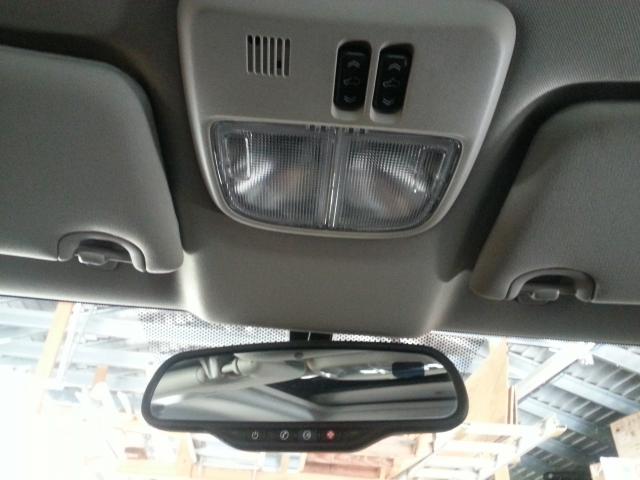
I do have these lights(pic below) and they each have an on/off, click switch. If you leave the switches pushed to on, they will stay in the "on" mode. The battery saver will time them out in about 15 mins after the car is shutdown.
BUT. I think they will go back to "on" once you restart the car. You then have to manually turn them off.
)Map lights "on" the mirror ? Switch "on" the mirror ?
Maybe your's is different from my 2010, but I don't have any lights or light switches on my mirror.
I do have these lights(pic below) and they each have an on/off, click switch. If you leave the switches pushed to on, they will stay in the "on" mode. The battery saver will time them out in about 15 mins after the car is shutdown.
BUT. I think they will go back to "on" once you restart the car. You then have to manually turn them off.
08-29-2014, 12:41 PM
#19
Join Date: 02-06-2011
Location: midwest
Posts: 8
Well I'm confused. (yeah, what else is new )
Map lights "on" the mirror ? Switch "on" the mirror ?
Maybe your's is different from my 2010, but I don't have any lights or light switches on my mirror.
I do have these lights(pic below) and they each have an on/off, click switch. If you leave the switches pushed to on, they will stay in the "on" mode. The battery saver will time them out in about 15 mins after the car is shutdown.
BUT. I think they will go back to "on" once you restart the car. You then have to manually turn them off.
Attachment 16510
)Map lights "on" the mirror ? Switch "on" the mirror ?
Maybe your's is different from my 2010, but I don't have any lights or light switches on my mirror.
I do have these lights(pic below) and they each have an on/off, click switch. If you leave the switches pushed to on, they will stay in the "on" mode. The battery saver will time them out in about 15 mins after the car is shutdown.
BUT. I think they will go back to "on" once you restart the car. You then have to manually turn them off.
Attachment 16510
Nope - that's not the way mine looks.... the lights and their switches are on the mirror.... I'll go get a pic


