Photo posting and over-sized images....

Thread Starter
Deceased
Joined: 06-30-2010
Posts: 25,739
From: Kannapolis NC
 Photo posting and over-sized images....
Hello everyone!
Just your humble Moderator Guy here with a friendly reminder/plea/request.
We're having a rash of HUGE photos in posts, some are over-sized, and some are beyond over-sized.
Now per our forum rules....
"Picture Size in Posts - If you are using the [img] tags, please make sure your pictures are not bigger then 640x480. If your pictures are larger then that, please resize them or if you can’t, just post a link. Many people are using dialup. Be respectful."
We have a size limit, and directly linking to photos hosted on Photobucket or other sites will cause your images to be over-sized if you don't re-size them manually.
However, if you host your photos here in the "Gallery", the re-sizing is automatic. If you're a new member or you've never used the gallery before, just click this link....
https://www.chevyhhr.net/forums/site-development-help-announcements-18/how-upload-add-pictures-your-post-old-3033/
Its a really nice "How To" that leads you through step by step.
OK, so you're thinking, "well I posted photos, are they over-sized?"
Here's a quick way to tell, this photo is the correct size....
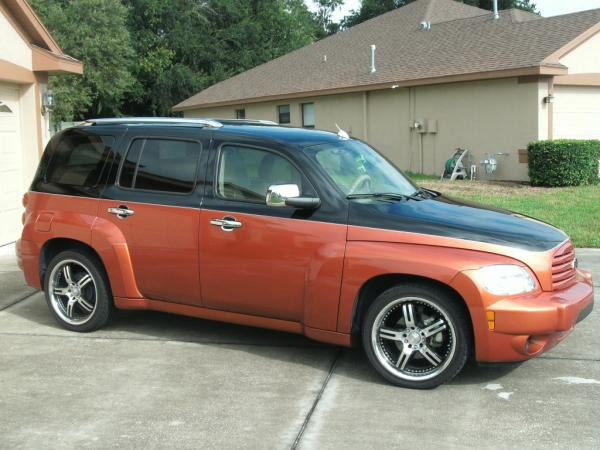
(Not picking on you ohnomobile, just grabbed one of your shots at random as an example, love that two-tone.)
So please check your posts and if your photos are over-sized, please host them in your Gallery, or re-size them. If you need help, just shoot me a PM and I'll be glad to give you a hand.
Just your humble Moderator Guy here with a friendly reminder/plea/request.
We're having a rash of HUGE photos in posts, some are over-sized, and some are beyond over-sized.
Now per our forum rules....
"Picture Size in Posts - If you are using the [img] tags, please make sure your pictures are not bigger then 640x480. If your pictures are larger then that, please resize them or if you can’t, just post a link. Many people are using dialup. Be respectful."
We have a size limit, and directly linking to photos hosted on Photobucket or other sites will cause your images to be over-sized if you don't re-size them manually.
However, if you host your photos here in the "Gallery", the re-sizing is automatic. If you're a new member or you've never used the gallery before, just click this link....
https://www.chevyhhr.net/forums/site-development-help-announcements-18/how-upload-add-pictures-your-post-old-3033/
Its a really nice "How To" that leads you through step by step.
OK, so you're thinking, "well I posted photos, are they over-sized?"
Here's a quick way to tell, this photo is the correct size....
(Not picking on you ohnomobile, just grabbed one of your shots at random as an example, love that two-tone.)
So please check your posts and if your photos are over-sized, please host them in your Gallery, or re-size them. If you need help, just shoot me a PM and I'll be glad to give you a hand.
Last edited by 843de; Jun 26, 2012 at 11:21 PM.

Thread Starter
Deceased
Joined: 06-30-2010
Posts: 25,739
From: Kannapolis NC
Honestly this isn't a "Reign of Terror" deal, over-sized photos are an issue for folks with slower connection speeds, smaller monitors, etc.
I'm going to give this a couple of days to sink in, then I'll be sending PM's to folks who need to re-size their photos.
I'm going to give this a couple of days to sink in, then I'll be sending PM's to folks who need to re-size their photos.

 Well that would look great on a T-Shirt, maybe I could sell them at my "Reign of Terror 2012" concession stand.
Senior Member
Joined: 02-27-2012
Posts: 136
From: upper midwest
I left dial up behind when we replaced the Packard Bell (how can something so recent, seem so long ago?). However I do often browse from the comfort of my EZ chair using a netbook and you can rest assured I find oversized images just as annoying as someone who has to crank the magneto to get their switchboard operator's attention 

Thread Starter
Deceased
Joined: 06-30-2010
Posts: 25,739
From: Kannapolis NC
Bump for exposure.
OK, just bumping this up again for folks to read, I've just spent an hour re-sizing photos and editing posts.
I shouldn't have to do that, its not my favorite thing to do.
So please either manually re-size your photos before posting them, of host them here in your Gallery so they are automatically re-sized.
OK, just bumping this up again for folks to read, I've just spent an hour re-sizing photos and editing posts.
I shouldn't have to do that, its not my favorite thing to do.
So please either manually re-size your photos before posting them, of host them here in your Gallery so they are automatically re-sized.