Chevy HHR Network
  • LOG IN
  • REGISTER
  • Forums
    • Main
      • Front Page News
      • The HHRs Of The Year
      • The HHR Of The Month
    • General Discussion
      • GM Recall Campaigns
      • Contests
      • General HHR
      • Maintenance and Upkeep
      • "How To" Tutorial Library
      • Problems/Service/Repairs
      • Commonly Used Part Numbers
    • HHR SS
      • HHR SS
      • SS Specific Service Issues/Repairs
    • Engine Performance
      • 2.0L Performance Tech
      • 2.2L Performance Tech
      • 2.4L Performance Tech
      • Racing Discussion
      • War Stories
    • Specific Technical Discussion
      • Brakes | Suspension | Shocks | Struts
      • Fuel Economy - Hypermiling
      • Drivetrain (Excluding Engine)
      • Tires & Wheels
      • Appearance/Modifications Discussions
      • Audio and Video
    • Marketplace
      • the *new* HHR Marketplace
      • Retired - Classifieds | Buy | Sell | Trade | Wanted Ads
      • Supporting Vendors
      • Inactive Classified Ads
      • Vendor Directory
    • Community
      • Featured HHR Submissions
      • Site Development, Help and Announcements
      • Introductions
      • Celebrations & Observances
      • Picture & Media
      • The Lounge
    • Regional - US
      • North East
      • Mid East
      • South East
      • North Central
      • Mid Central
      • South Central
      • North Mountain
      • South Mountain
      • North Pacific
      • South Pacific
    • Regional - Global
      • Canadian North East
      • Canadian Mid East
      • Canadian Mid West
      • Canadian North Pacific
      • Mexico/South America
      • Europe
      • Asia/Pacific
  • Marketplace
    • Vendor Directory
    • Become a Vendor
    • Site Store
    • the HHR Marketplace
  • New Posts
  • Tools
    • Car Payment Calculator
    • Recalls
    • Technical Service Bulletins (TSBs)
    • Members List
    • Live Feed
  • Gallery
  • View Dark Mode
    • Please register or login to enable Dark Mode.
  • Log In
  • Register
Chevy HHR Network
    • Threads
      • Advanced
Dark Mode

Please register or login to enable Dark Mode.

Log In

Forgot your Password?

By logging into your account, you agree to our Terms of Use and Privacy Policy, and to the use of cookies as described therein.
  • Recent
  • Commented
  • Albums
  • My Pictures

My Post Pictures

desertrat
April 22, 2018
 70
 0
Sort:
Default
  • Default
  • Most Recent
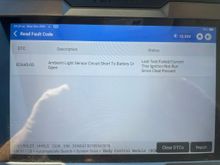
This is the fault code, but it doesn't activate an MIL. This cannot be erased.
0 2025/12/29 09:55:49 desertrat
0 2026/01/08 06:14:32 desertrat
The old and new GM cooler lines before modification. The shorter line must be cut to allow the hoses to be installed. The part that goes into the radiator will be a short stub with a 90. Use 2 clamps on each hose.
0 2026/01/08 06:15:05 desertrat
0 2026/01/08 06:17:24 desertrat
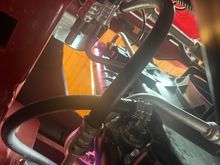
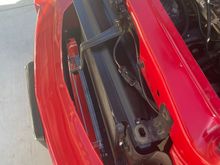
Here's the view from above.
0 2026/01/08 06:20:16 desertrat
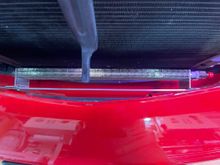
This is the new cooler in place. Note how the hose clamps are staggered, they do no have to be doubled here.
0 2026/01/08 06:21:24 desertrat
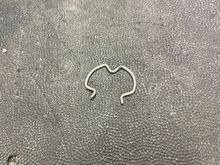
This is a Jesus clip, and holds the cooler line into the radiator. Have extra on hand, you will lose at least 1.
0 2026/01/08 06:35:50 desertrat
Use oil cooler hose ONLY! I bought mine online, local parts store didn't have it.
0 2026/01/08 06:37:02 desertrat
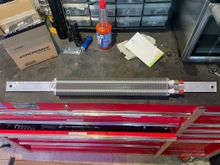
The cooler mounted on the aluminum flat bar. The holes have to be elongated slightly because the bolts on the bumper are not parallel.
0 2026/01/08 07:50:34 desertrat
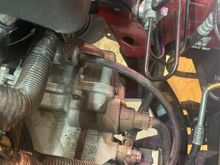
The cooler in place before it was connected to the transmission.
0 2026/01/08 07:52:24 desertrat
This is a better view of how the cooler is mounted.
0 2026/01/09 05:11:48 desertrat
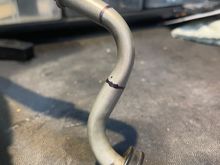
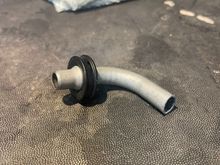
Cut the return line pipe where you see the 2 black lines. The new cooler is plumbed in between these 2 points. The stub goes into the lower radiator port.
0 2026/01/10 08:56:44 desertrat
This is what the stub should look like after the cuts.
0 2026/01/10 08:58:29 desertrat
0 2026/01/11 08:00:34 desertrat
0 2026/01/11 08:01:10 desertrat
0 2026/01/11 08:01:34 desertrat
0 2026/01/11 08:01:52 desertrat
0 2026/02/01 05:56:06 desertrat
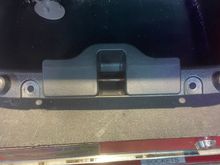
Remove the cap at the top of the pillar trim and remove the 7mm screw. The trim pulls up and out.
0 2026/02/01 06:10:25 desertrat
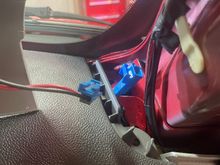
Disconnect the speaker.
0 2026/02/01 06:11:29 desertrat
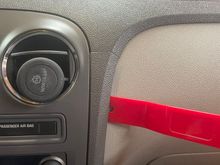
Remove the radio trim by prying outward about 2" down from the seam. Pull the trim out and tilt the section outward. It is not necessary to remove this part or disconnect the wiring.
0 2026/02/01 06:12:16 desertrat
0 2026/02/01 06:15:15 desertrat
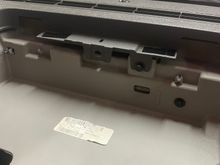
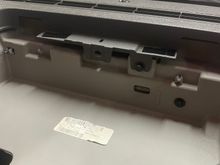
Remove the dash compartment by removing the 2 Phillips screws. The unit then pulls out.
0 2026/02/01 06:16:36 desertrat
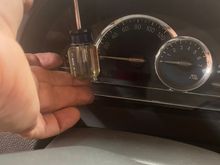
Remove this screw with a 7 mm.
0 2026/02/01 06:17:40 desertrat
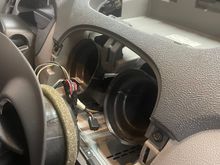
Remove the 2 Phillips screws above the instrument cluster.
0 2026/02/01 06:18:16 desertrat
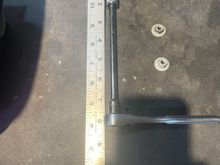
Get a 10 mm socket with an extension, 1/4".
0 2026/02/01 06:20:06 desertrat
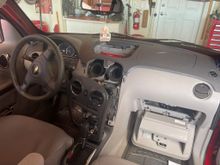
Lower the glove box door to gain access to the airbag nuts.
0 2026/02/01 06:21:22 desertrat
Looking up through the glove box opening you will see 2 studs. Remove the nuts from each stud using the 11 mm socket and ratchet.
0 2026/02/01 06:22:27 desertrat
This is where it gets tough. You can easily lift the left side of the dash to get some access to the sensor, but it is difficult. If you wiggle the dash section forward and back it loosens a little, but not much, and didn't come entirely loose for me. If anyone knows how to loosen the right side of this section please comment.
Note- make sure the speaker wires are in the clear when reattaching the dash.

This is where it gets tough. You can easily lift the left side of the dash to get some access to the sensor, but it is difficult. If you wiggle the dash section forward and back it loosens a little, but not much, and didn't come entirely loose for me. If anyone knows how to loosen the right side of this section please comment. Note- make sure the speaker wires are in the clear when reattaching the dash.
0 2026/02/01 06:25:11 desertrat
Ground the dark green wire and the fan will run.
0 2026/02/01 08:48:34 desertrat
 
First
Page
2 of 2
Last
Go To
Page
  • 1
  • 2
2 of 2
Go To GO
Go to page of 2 pages
  • 1
  • 2

Top
Chevy HHR Network
  • Contact Us
  • Rules and FAQ
  • Archive
  • Advertising
  • Cookie Policy
  • Privacy Statement
  • Terms of Service
  • Your Privacy Choices
  • Manage Preferences

© 2026 MH Sub I, LLC dba Internet Brands


When you click on links to various merchants on this site and make a purchase, this can result in this site earning a commission. Affiliate programs and affiliations include, but are not limited to, the eBay Partner Network.