


Another member using Pioneer!


Thread Starter
Senior Member
Joined: 09-02-2010
Posts: 383
From: Philadelphia, PA
Another member using Pioneer!
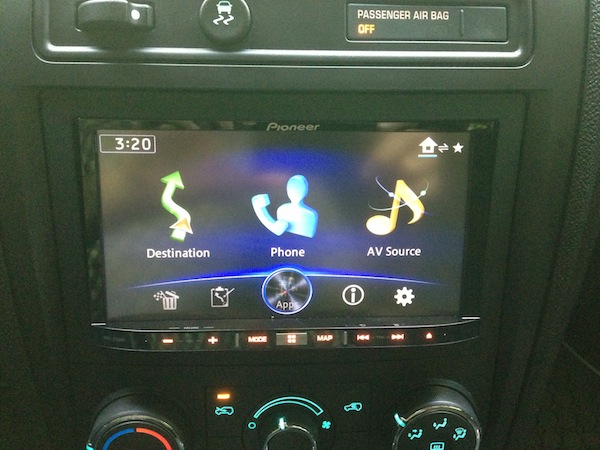
Over the weekend my brother and I installed the Pioneer AVIC-Z150BH head unit into my 1LT. After spending months on the forms reading up on hints, tricks, and parts needed for the install, we went to work with the following:
AVIC-Z150BH head unit
GMOS-LAN-03 to keep car chimes
Metra 95-3302 dash kit
Metra ASWC-1 for the steering wheel controls
Metra 40-CR30 antenna adapter
Pioneer SXV200v1 seriusXM adapter
Pioneer ND-BC6 Rear View Camera
CDIH202 hdmi cable interface for iPhone 5
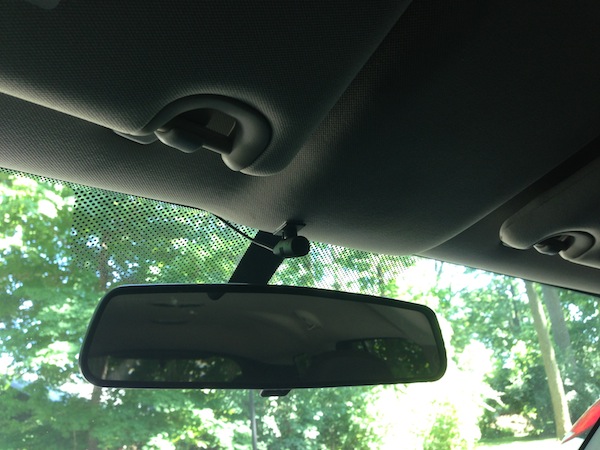
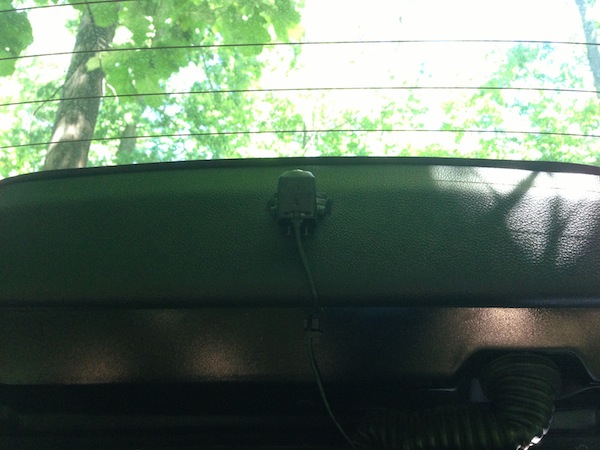
We soldered the wires from the GMOS-LAN-03 to the aftermarket harness, mounted the backup camera from the 3rd brake light inside the car, and seriusXM antenna on the back right side of the car near the lift gate (running wires from backup camera and seriusXM through the weather stripping of the lift gate and through the interior right wall.) Finally, we attached the bluetooth microphone to the right of the drivers visor since I didn't want to clip it to the visor as recommended by Pioneer.
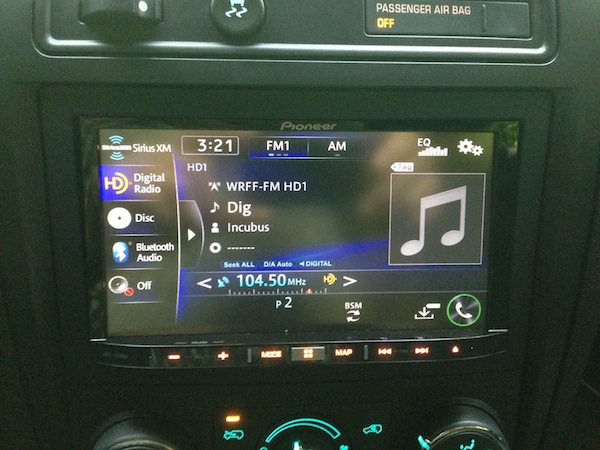
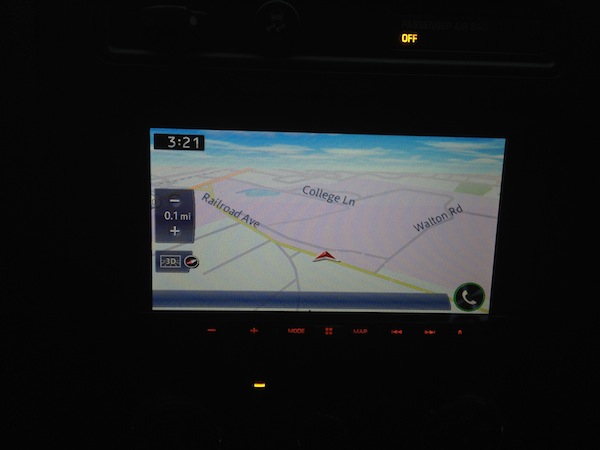
Photos below are the end result for and what the unit looks like in the center cluster. Head unit goes perfectly with the TS-A1685R's I put in a few months ago.
Some things I've noticed/still need to figure out:
Backup camera - Head unit switches to camera view when car is in park or drive, but turns it off when car is in reverse. Need to check the wires to make sure everything is connected correctly. There is no image, so I have to check the Pioneer settings to make sure everything is correct.
When using GPS - I have it for the screen to automatically adjust from day and night. GPS changes to night when auto lights go on. When high beams are on, the GPS switches to day time. I could just turn this off, or just deal with it (which is what I'll do).
EQ - We installed the HU Saturday, but ran out of time to wire the microphone through the A pillar to the HU. Everything worked great Saturday and Sunday, and I had extra time to install the microphone properly Monday. Installed the microphone, and now the EQ cuts in and out, and eventually disables itself (reducing the volume) for all media (SiriusXM, HD Radio, CD, Bluetooth audio). When this happens, I cannot adjust the volume of any media, but the button sounds, navigation voice, and phone calls are all at their respectable volume. Called Pioneer and they said they have never heard of this before, but offered to repair the HU if I ship it back to them in CA. Being that I live in PA, I'm going to try and do a firmware update to see if it resolves the issue. If not, I'm gonna disconnect the microphone and see if the problem still exist. If so, then I'll send it back to them.
Hope everyone enjoys the read, and maybe gets a few chuckles out of it!
AVIC-Z150BH head unit
GMOS-LAN-03 to keep car chimes
Metra 95-3302 dash kit
Metra ASWC-1 for the steering wheel controls
Metra 40-CR30 antenna adapter
Pioneer SXV200v1 seriusXM adapter
Pioneer ND-BC6 Rear View Camera
CDIH202 hdmi cable interface for iPhone 5
We soldered the wires from the GMOS-LAN-03 to the aftermarket harness, mounted the backup camera from the 3rd brake light inside the car, and seriusXM antenna on the back right side of the car near the lift gate (running wires from backup camera and seriusXM through the weather stripping of the lift gate and through the interior right wall.) Finally, we attached the bluetooth microphone to the right of the drivers visor since I didn't want to clip it to the visor as recommended by Pioneer.
Photos below are the end result for and what the unit looks like in the center cluster. Head unit goes perfectly with the TS-A1685R's I put in a few months ago.
Some things I've noticed/still need to figure out:
Backup camera - Head unit switches to camera view when car is in park or drive, but turns it off when car is in reverse. Need to check the wires to make sure everything is connected correctly. There is no image, so I have to check the Pioneer settings to make sure everything is correct.
When using GPS - I have it for the screen to automatically adjust from day and night. GPS changes to night when auto lights go on. When high beams are on, the GPS switches to day time. I could just turn this off, or just deal with it (which is what I'll do).
EQ - We installed the HU Saturday, but ran out of time to wire the microphone through the A pillar to the HU. Everything worked great Saturday and Sunday, and I had extra time to install the microphone properly Monday. Installed the microphone, and now the EQ cuts in and out, and eventually disables itself (reducing the volume) for all media (SiriusXM, HD Radio, CD, Bluetooth audio). When this happens, I cannot adjust the volume of any media, but the button sounds, navigation voice, and phone calls are all at their respectable volume. Called Pioneer and they said they have never heard of this before, but offered to repair the HU if I ship it back to them in CA. Being that I live in PA, I'm going to try and do a firmware update to see if it resolves the issue. If not, I'm gonna disconnect the microphone and see if the problem still exist. If so, then I'll send it back to them.
Hope everyone enjoys the read, and maybe gets a few chuckles out of it!

Senior Member
Joined: 04-01-2013
Posts: 182
From: Chula Vista CA
I installed the same head unit a couple months ago in my HHR and learned several things.
- For the backup camera I tapped the left backup power source since that is where the factory taps for the power signal. I had to make sure the camera used a power supply and its own ground which there is a very good one in the left rear area behind the small panel. I used a wireless unit as I do not like running wires under the carpet, etc. The front connection connects to the RCA that is the backup one.
- The adapter or interface unit connects the head unit lighting to the vehicle lights and that signal comes from the low beam feed. I do not think it can be changed.
- The head unit has a blue/white wire that is labeled for an amp and not used according to Pioneer. The interface company said it needs to be connected to the interface and all will work fine. I would suggest calling them to see what they say.
- My steering wheel controls all work fine as does blue tooth and the iPhone apps and such. Again the interface company is the place to call if there are questions.
- I would suggest buying the adapter cable that is now sold as an accessory for the X950BH which allows hard wiring the phone to the head unit. It also disconnects in the middle and has a USB connector so you can load up a thumb drive and stick it in the glove box and not worry about blue tooth issues. I have about 4000 MP3 songs and about 200 videos on one and figure I'll get through it in about 2 or 3 years!
- So you can watch videos, do what is called "bypassing" or moving one of the wires in the connector that has the RCA plugs so the head unit thinks the car is stopped. Also ground the parking brake wire and videos can play while moving if those in back want to watch.
- A great website is "www.AVIC411.com" as they have instructions on the bypass procedure and other questions. You have to sign up.
- For the backup camera I tapped the left backup power source since that is where the factory taps for the power signal. I had to make sure the camera used a power supply and its own ground which there is a very good one in the left rear area behind the small panel. I used a wireless unit as I do not like running wires under the carpet, etc. The front connection connects to the RCA that is the backup one.
- The adapter or interface unit connects the head unit lighting to the vehicle lights and that signal comes from the low beam feed. I do not think it can be changed.
- The head unit has a blue/white wire that is labeled for an amp and not used according to Pioneer. The interface company said it needs to be connected to the interface and all will work fine. I would suggest calling them to see what they say.
- My steering wheel controls all work fine as does blue tooth and the iPhone apps and such. Again the interface company is the place to call if there are questions.
- I would suggest buying the adapter cable that is now sold as an accessory for the X950BH which allows hard wiring the phone to the head unit. It also disconnects in the middle and has a USB connector so you can load up a thumb drive and stick it in the glove box and not worry about blue tooth issues. I have about 4000 MP3 songs and about 200 videos on one and figure I'll get through it in about 2 or 3 years!
- So you can watch videos, do what is called "bypassing" or moving one of the wires in the connector that has the RCA plugs so the head unit thinks the car is stopped. Also ground the parking brake wire and videos can play while moving if those in back want to watch.
- A great website is "www.AVIC411.com" as they have instructions on the bypass procedure and other questions. You have to sign up.

Senior Member
Joined: 05-22-2010
Posts: 581
From: Puckett, Mississippi
On my Pioneer unit (different model), the backup camera had a setting to select whether you wanted a positive voltage to trigger it, or a ground signal. You might check that setting (if that model has it) to see what it's set to.

Joined: 03-08-2013
Posts: 7
From: nyc
Pioneer head unit
CHECK REAR OF YOUR UNIT. MY PIONEER 4400 HAS A BROWN RCA JACK FOR THE BACKUP CAMERA CONNECTION IN THE CORNER (LEFTSIDE OF THE PICTURE). I HAD TAKEN UNIT OUT FOR SERVICE AFTER IT WAS INSTALLED BY A PRO AND WHEN I HOOKED IT BACK UP (NO PUN INTENDED) I ACCIDENTLY PLUGGED THE CAMERA INTO ONE OF THE VIDEO RCA INPUTS (YELLOW) ON THE RIGHT

Thread Starter
Senior Member
Joined: 09-02-2010
Posts: 383
From: Philadelphia, PA
Thanks everyone for the input! I actually had time this weekend and resolved all issues with the following:
EQ cutting out - I updated the firmware, and when the EQ cut out an "ATT" box would appear on the right side of the HU display. I just disconnected the mute wire of the GMOS adapter going to the mute wire on the HU and taped both ends off. I figured there's no need to mute the system since I selected to have the radio reduce to -25 when any calls come through/GPS has to announce directions.
Steering wheel controls - spent a good amount of time on the phone with AXXIS to see what the problem was. I had the 1/8" of the GMOS harness plugged into the 1/8" aux input on the radio, instead of the W/R input on the back. The back of the AVIC-Z150BH has some inputs on the back, then has a wire harness for all A/V inputs. I was thinking the 1/8" AV input was the correct one....rookie mistake
As for the backup camera, jmal628 you are 100% correct. First off, since I already soldered all 12V wires, I was lazy and soldered the backup camera to the additonal 12v wire from the HU harness then connect the two groups with a butt connector. Since there's not a lot of room back there, the one end came loose. cut all 12v wires and re-soldered them together. Once I did that, I switched the HU from giving the camera Ground power, to battery power. Image came up, and is surprisingly clear for being inside the car (little pixleated in the dark, but the backup lights give plenty of light to see). Now I just have to mess with camera angle, and the backup guidance lines.
EQ cutting out - I updated the firmware, and when the EQ cut out an "ATT" box would appear on the right side of the HU display. I just disconnected the mute wire of the GMOS adapter going to the mute wire on the HU and taped both ends off. I figured there's no need to mute the system since I selected to have the radio reduce to -25 when any calls come through/GPS has to announce directions.
Steering wheel controls - spent a good amount of time on the phone with AXXIS to see what the problem was. I had the 1/8" of the GMOS harness plugged into the 1/8" aux input on the radio, instead of the W/R input on the back. The back of the AVIC-Z150BH has some inputs on the back, then has a wire harness for all A/V inputs. I was thinking the 1/8" AV input was the correct one....rookie mistake
As for the backup camera, jmal628 you are 100% correct. First off, since I already soldered all 12V wires, I was lazy and soldered the backup camera to the additonal 12v wire from the HU harness then connect the two groups with a butt connector. Since there's not a lot of room back there, the one end came loose. cut all 12v wires and re-soldered them together. Once I did that, I switched the HU from giving the camera Ground power, to battery power. Image came up, and is surprisingly clear for being inside the car (little pixleated in the dark, but the backup lights give plenty of light to see). Now I just have to mess with camera angle, and the backup guidance lines.
Thread Starter
Senior Member
Joined: 09-02-2010
Posts: 383
From: Philadelphia, PA
I installed the same head unit a couple months ago in my HHR and learned several things.
- For the backup camera I tapped the left backup power source since that is where the factory taps for the power signal. I had to make sure the camera used a power supply and its own ground which there is a very good one in the left rear area behind the small panel. I used a wireless unit as I do not like running wires under the carpet, etc. The front connection connects to the RCA that is the backup one.
- The adapter or interface unit connects the head unit lighting to the vehicle lights and that signal comes from the low beam feed. I do not think it can be changed.
- The head unit has a blue/white wire that is labeled for an amp and not used according to Pioneer. The interface company said it needs to be connected to the interface and all will work fine. I would suggest calling them to see what they say.
- My steering wheel controls all work fine as does blue tooth and the iPhone apps and such. Again the interface company is the place to call if there are questions.
- I would suggest buying the adapter cable that is now sold as an accessory for the X950BH which allows hard wiring the phone to the head unit. It also disconnects in the middle and has a USB connector so you can load up a thumb drive and stick it in the glove box and not worry about blue tooth issues. I have about 4000 MP3 songs and about 200 videos on one and figure I'll get through it in about 2 or 3 years!
- So you can watch videos, do what is called "bypassing" or moving one of the wires in the connector that has the RCA plugs so the head unit thinks the car is stopped. Also ground the parking brake wire and videos can play while moving if those in back want to watch.
- A great website is "www.AVIC411.com" as they have instructions on the bypass procedure and other questions. You have to sign up.
- For the backup camera I tapped the left backup power source since that is where the factory taps for the power signal. I had to make sure the camera used a power supply and its own ground which there is a very good one in the left rear area behind the small panel. I used a wireless unit as I do not like running wires under the carpet, etc. The front connection connects to the RCA that is the backup one.
- The adapter or interface unit connects the head unit lighting to the vehicle lights and that signal comes from the low beam feed. I do not think it can be changed.
- The head unit has a blue/white wire that is labeled for an amp and not used according to Pioneer. The interface company said it needs to be connected to the interface and all will work fine. I would suggest calling them to see what they say.
- My steering wheel controls all work fine as does blue tooth and the iPhone apps and such. Again the interface company is the place to call if there are questions.
- I would suggest buying the adapter cable that is now sold as an accessory for the X950BH which allows hard wiring the phone to the head unit. It also disconnects in the middle and has a USB connector so you can load up a thumb drive and stick it in the glove box and not worry about blue tooth issues. I have about 4000 MP3 songs and about 200 videos on one and figure I'll get through it in about 2 or 3 years!
- So you can watch videos, do what is called "bypassing" or moving one of the wires in the connector that has the RCA plugs so the head unit thinks the car is stopped. Also ground the parking brake wire and videos can play while moving if those in back want to watch.
- A great website is "www.AVIC411.com" as they have instructions on the bypass procedure and other questions. You have to sign up.
I actually did purchase the Pioneer CDIH202 cables since Pioneer's website said it was for the iPhone 5, but you still need to buy an HDMI adapter for the iPhone. I was surprised to see I can search through my phone's music when I'm streaming audio through bluetooth. The plan is to connect the CDIH202 for the iPhone, then run an additional USB extender to the compartment on the dash that way I can connect my iPhone, or have an additional USB input so I can leave my iPod in the car permanently or for friends to connect their device(s) when in my car.
Senior Member
Joined: 04-01-2013
Posts: 182
From: Chula Vista CA
You can load up a thumb drive with 3000 or more songs and videos and stick it in the glove box and in a year or so when you cycle through all of them, you can update them. That is where browsing the newgroups come in handy as there are copies of just about every song ever played by anyone on there in MP3 format! I would guess a million or more.......

Thread
Thread Starter
Forum
Replies
Last Post
Gambler
Site Development, Help and Announcements
42
Nov 20, 2011 08:44 AM
GRUMPEE
Site Development, Help and Announcements
1
Mar 10, 2011 11:16 AM