


Head Unit Replacement Advice!


Senior Member
Joined: 04-01-2013
Posts: 182
From: Chula Vista CA
I agree with Donbrew as this is NOT rocket science and is actually very easy to do. As long as you get the correct adapters the plugs do fit perfectly! The waterfall is very easy, the batt. is easy to disconnect but at least on mine I had to pull the heater control panel and get it moved a bit. The worst part was cutting the plastic and there are videos and instructions covering how to do this stuff all over the internet and then you can say "you did it"!

Member
Joined: 11-24-2013
Posts: 92
From: SW Michigan
Cutting plastic is my life! Use a Dremel, and make sure there are no wiring harness behind the plastic you are cutting. If it wasn't for cutting the plastic out of some cars you wouldn't get results like these:
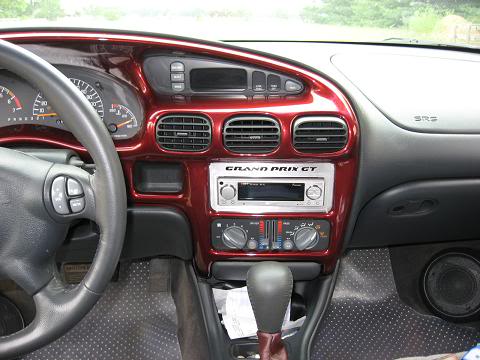
My buddy's Grand Prix
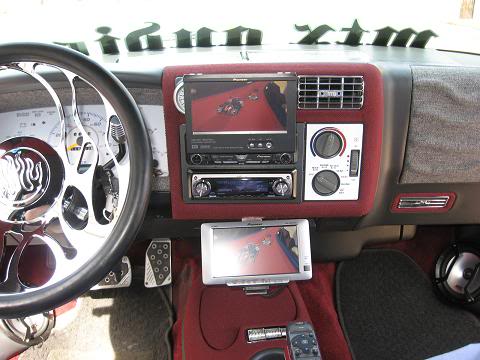
2 DIN units in my 94 S10, now that was some cutting!
My buddy's Grand Prix
2 DIN units in my 94 S10, now that was some cutting!

Thread Starter
Senior Member
Joined: 10-20-2009
Posts: 106
From: Fort Worth Texas
Understood. However, Best Buy and other installers have something I don't and that is safety in numbers. This is a project I do not feel I could do by myself without causing some damage or wiring something wrong. And cutting? Definitely out of the picture for me DIY. As I mentioned, if I had some friends that I could trust and they knew how to do, I would be more than willing to jump in and do it together.
For now, I'll save my dollars until I can get everything done.
Now I have to figure out which head unit to go with. Most of what I've seen have the USB and AV ports (3.5mm) in the back of the unit. I prefer to have them in the front. I don't want to have to have an external wire go into my glovebox just to plug into the USB or AV jack. Any ideas?
Thanks
Blue
For now, I'll save my dollars until I can get everything done.
Now I have to figure out which head unit to go with. Most of what I've seen have the USB and AV ports (3.5mm) in the back of the unit. I prefer to have them in the front. I don't want to have to have an external wire go into my glovebox just to plug into the USB or AV jack. Any ideas?
Thanks
Blue
Senior Member
Joined: 04-01-2013
Posts: 182
From: Chula Vista CA
I found the USB connector in the glove box to be handy as it is out of the way and easy to get to when needed. I have a very large thumb drive with around 3000 MP3 songs and I am about 50% through them. I also have about 250 music videos which my bull dog likes to witch when we go somewhere.
Member
Joined: 11-24-2013
Posts: 92
From: SW Michigan
I agree with oldracer, although I'm not into compressed music, having the USB and AUX input at the rear of the deck cleans up the dash. Look again at the pics I posted, nice and clean without any goofy stuff plugged into the front.
Plus if it were an iPod, it would be out of sight from prying eyes.
Plus if it were an iPod, it would be out of sight from prying eyes.

Senior Member
Joined: 12-22-2011
Posts: 249
From: Belleville
best buy will match amazon prices...also I have a USB extender...it plugs into my rear USB cable and comes out in my center console in the pocket above the E brake...really slick and easy to do.
part looks like this http://img.photobucket.com/albums/v1...l/IMG_0454.jpg
part looks like this http://img.photobucket.com/albums/v1...l/IMG_0454.jpg

Thread
Thread Starter
Forum
Replies
Last Post

