


pairing my phone 09 hhr

Platinum Member
Joined: 12-06-2009
Posts: 11,721
From: Alabama
You never said what part of the pairing process didn't work. If you didn't get past these steps or didn't get any voice promps, then I would doubt you have Bluetooth.
Pairing a Phone
1. Press and hold ------ for two seconds. The system
responds with “Ready” followed by a tone.
2. Say “Bluetooth”. The system responds with
“Bluetooth ready” followed by a tone.
3. Say “Pair”. The system responds with instructions
and a four digit PIN number. The PIN number will
be used in Step 4.
Note: The dashes above are the 2 steering wheel control buttons. They didn't transfer on this copy/paste.
Pairing a Phone
1. Press and hold ------ for two seconds. The system
responds with “Ready” followed by a tone.
2. Say “Bluetooth”. The system responds with
“Bluetooth ready” followed by a tone.
3. Say “Pair”. The system responds with instructions
and a four digit PIN number. The PIN number will
be used in Step 4.
Note: The dashes above are the 2 steering wheel control buttons. They didn't transfer on this copy/paste.

Platinum Member
Joined: 05-09-2006
Posts: 6,805
From: "Upland" Mesa, Arizona
As fireman says, his window sticker says the Bluetooth is an option. Don't know what the option code is, BUT it should be listed on the option sheet located on the inside of the glove box door.
There is an option code list somewhere on this forum. If I locate it I'll provide that info.
There is an option code list somewhere on this forum. If I locate it I'll provide that info.
Platinum Member
Joined: 12-06-2009
Posts: 11,721
From: Alabama
After looking again, it's not an option, but under standard equipment. Although it is a separate listing, it should be integral to the Premium Head unit.
The RPO codes probably won't have a separate code for just the Bluetooth. It should be the RPO code for the Bluetooth enabled head unit.
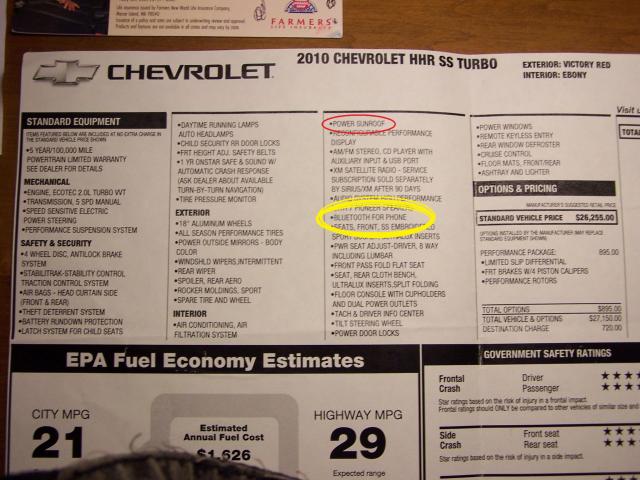
The RPO codes probably won't have a separate code for just the Bluetooth. It should be the RPO code for the Bluetooth enabled head unit.


Platinum Member
Joined: 04-09-2006
Posts: 7,043
From: Vancouver, BC, Canada
UPF - https://www.chevyhhr.net/forums/gene...s-12674/page2/
Also read - HHR bluetooth - Chevrolet Forum - Chevy Enthusiasts Forums especially the comment "That's not always, even with 2LT. You don't mention the RPO code UPF on the sticker inside the glove compartment door and thus I suspect you'll find UE0 for "OnStar delete" instead. UPF and UE0 are mutually exclusive since Bluetooth is an addition to the OnStar VCIM hardware. If you don't have OnStar, don't waste your time."
Also read - HHR bluetooth - Chevrolet Forum - Chevy Enthusiasts Forums especially the comment "That's not always, even with 2LT. You don't mention the RPO code UPF on the sticker inside the glove compartment door and thus I suspect you'll find UE0 for "OnStar delete" instead. UPF and UE0 are mutually exclusive since Bluetooth is an addition to the OnStar VCIM hardware. If you don't have OnStar, don't waste your time."

Thread
Thread Starter
Forum
Replies
Last Post