


pioneer 5800 install experts in here please




Senior Member
Joined: 02-03-2006
Posts: 1,785
From: So Cal
Originally Posted by mudbilly
in some other thread, that I can no longer locate, there was mention of problems with running the coax cable from the HU to the amp in the rear because the battery power cable runs along one side of the car and then crosses over 
can anyone shed any light on this issue??
can anyone shed any light on this issue??
I had to move my RCA's, from the head unit, to the passengers side and run them behind the rear seats into the spare tire area. There is still a pretty good chance you're going to get some type of noise. Check your ground points and make sure they are not painted. Try to keep you negative amp wires short and keep any sound wires away from power wires.
BTW...I got your PM, I'll reply in a little bit, got to do some errands...

Ng

Thread Starter
Senior Member
Joined: 07-29-2006
Posts: 128
From: annapolis md
work in process pics
well, as stated in my panic attack thread, the head unit, speakers, and 1'st amp are in and functioning.......
i had to fab some brackets for the tweeters, i came REAL close to cutting out a hole for it to stick thru and just glueing it in place, i thought (and still do) that it would look sharp, but figured i'd just butcher up the part and wind up having to buy a new one............
the brackets that came with the unit were all meant for 3 point mounting, of course the HHR had a 2 point mount
so
i hack sawed some aluminum strips out a piece of metal that i scrounged from work, knowing that it would eventually come in handy


i used some extra nuts as spacers to get the correct standoff.

the first attemp at screwing it together was almost a tragedy, the screws i bought were too long and they bulged out the plastic on the piller, they didn't poke thru so i was able to press them back down, i used a grinder to shorten them up a bit
here is the amp, i guess i'll have to spend a little time prettying it up at some point
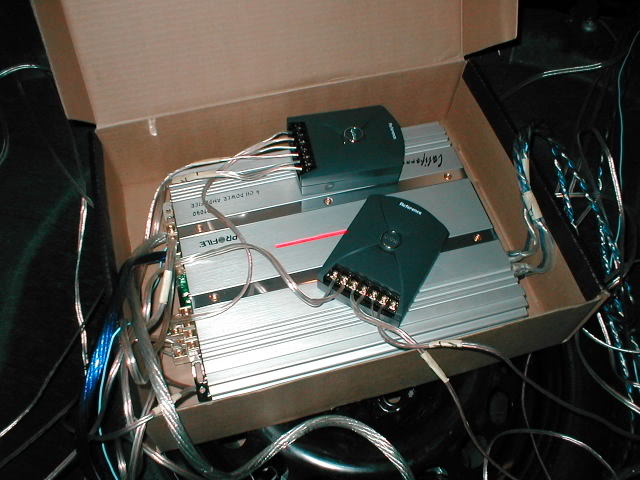
i'm gonna wait till i get the sub and it's amp in and before figuring all that out
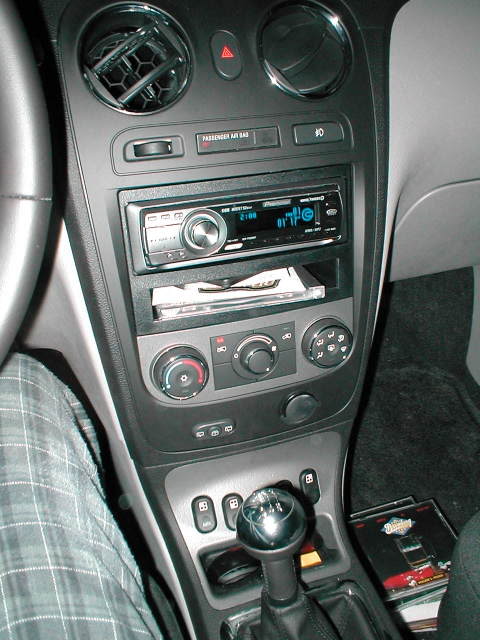
i had to fab some brackets for the tweeters, i came REAL close to cutting out a hole for it to stick thru and just glueing it in place, i thought (and still do) that it would look sharp, but figured i'd just butcher up the part and wind up having to buy a new one............
the brackets that came with the unit were all meant for 3 point mounting, of course the HHR had a 2 point mount
so
i hack sawed some aluminum strips out a piece of metal that i scrounged from work, knowing that it would eventually come in handy
i used some extra nuts as spacers to get the correct standoff.
the first attemp at screwing it together was almost a tragedy, the screws i bought were too long and they bulged out the plastic on the piller, they didn't poke thru so i was able to press them back down, i used a grinder to shorten them up a bit
here is the amp, i guess i'll have to spend a little time prettying it up at some point
i'm gonna wait till i get the sub and it's amp in and before figuring all that out
Thread Starter
Senior Member
Joined: 07-29-2006
Posts: 128
From: annapolis md
steering wheel radio control
well, i bought and installed this guy
http://www.crutchfield.com/S-xf83Jh9...eel&i=127SWIPS
but i can't seem to program it, of course it is difficult to know if it is even hooked up correctly, since it is not supposed to be used with the HHR, but i figger that there has got to be a way
has anyone here installed one of these ???
http://www.crutchfield.com/S-xf83Jh9...eel&i=127SWIPS
but i can't seem to program it, of course it is difficult to know if it is even hooked up correctly, since it is not supposed to be used with the HHR, but i figger that there has got to be a way
has anyone here installed one of these ???
Senior Member
Joined: 02-03-2006
Posts: 1,785
From: So Cal
Originally Posted by mudbilly
well, i bought and installed this guy
http://www.crutchfield.com/S-xf83Jh9...eel&i=127SWIPS
but i can't seem to program it, of course it is difficult to know if it is even hooked up correctly, since it is not supposed to be used with the HHR, but i figger that there has got to be a way
has anyone here installed one of these ???
http://www.crutchfield.com/S-xf83Jh9...eel&i=127SWIPS
but i can't seem to program it, of course it is difficult to know if it is even hooked up correctly, since it is not supposed to be used with the HHR, but i figger that there has got to be a way
has anyone here installed one of these ???
LINKY
For programming it took me a couple of times to get it right. Just follow the directions step by step......LINKY 2
NG
Ng

Senior Member
Joined: 05-01-2006
Posts: 384
From: Roanoke, VA
Yep, just follow ng's lead there in his install thread. And you'll hook up a wire to your headunit as well instead of using the IR. I have the Alpine/Kenwood version hooked up to mine and it works great.
Thread Starter
Senior Member
Joined: 07-29-2006
Posts: 128
From: annapolis md
Originally Posted by ng8650
Install should be the same, the only diff is that you will hook up to the back of the head unit instead of looking for a home for the IR
LINKY
LINKY
Originally Posted by DaJoker
Yep, just follow ng's lead there in his install thread. And you'll hook up a wire to your headunit as well instead of using the IR. I have the Alpine/Kenwood version hooked up to mine and it works great
Well after reading the links, my HU had a socket in the rear that mates with the plug on the PAC SWI-X so I should be good to go there. I also installed it using the same wires as discribed in the thread.
I have two questions:
1: Is it correct that the only thing I am missing is supplying +12 to the steering wheel controls that used to be supplied by the original stereo???
2: What programming version do I use? I assume version #1 since that is what is used with every GM vehicle listed.
Senior Member
Joined: 02-03-2006
Posts: 1,785
From: So Cal
Originally Posted by mudbilly
Well after reading the links, my HU had a socket in the rear that mates with the plug on the PAC SWI-X so I should be good to go there. I also installed it using the same wires as discribed in the thread.
I have two questions:
1: Is it correct that the only thing I am missing is supplying +12 to the steering wheel controls that used to be supplied by the original stereo???
2: What programming version do I use? I assume version #1 since that is what is used with every GM vehicle listed.
I have two questions:
1: Is it correct that the only thing I am missing is supplying +12 to the steering wheel controls that used to be supplied by the original stereo???
2: What programming version do I use? I assume version #1 since that is what is used with every GM vehicle listed.
2. Yes. Go with version 1. Go to the PAC audio website (LINKY 2), they have updated info and you can select by auto, make, and head unit.
Late
Ng
Thread Starter
Senior Member
Joined: 07-29-2006
Posts: 128
From: annapolis md
Originally Posted by ng8650
1. Yes. The factory steering wheel controls got power from the OEM head unit. You're going to have to tap into a switched power source for the steering wheel controls to work. I tapped into fuse #21 in the center console. Check my install, I think it's the blue wire that will need the switched power. I used the same source to power my PAC steering wheel interface.
2. Yes. Go with version 1. Go to the PAC audio website (LINKY 2), they have updated info and you can select by auto, make, and head unit.
Late
Ng
2. Yes. Go with version 1. Go to the PAC audio website (LINKY 2), they have updated info and you can select by auto, make, and head unit.
Late
Ng

i didn't realize (i didn't click on the linky2
 since I had the instructions that came with the unit)
 of course my instructions did not have the HHR listed
BTW, I have slight engine whine coming thru the speakers. I routed all the RCA cables down the passenger side, and I traced the +12 battery cable to where it crosses from the battery to the middle of the car under the rear seat. I don't think that it is a problem with the 12v power and audio cables runnning parrallel to each other.
I ordered 3 of these filters.
http://www.crutchfield.com/S-eJD0Xpc...oise&i=127SNI1
I had good success with something similar to this with my old stang.