


F.O.B. Battery?

Moderator
Joined: 01-23-2009
Posts: 26,532
From: Fredericksburg,VA
Did the original remote have a LCD screen on it?
The "low battery" signal is sent when you press a key; the error code sets after it receives the signal 3 consecutive times from the same fob.
There are 3 codes that could be stored in the computer, they don't cause a CEL, just the dash message. B3109,B3110,B3111 or B3112; they are for the 4 possible fobs (109 for #1, 112 for #4).
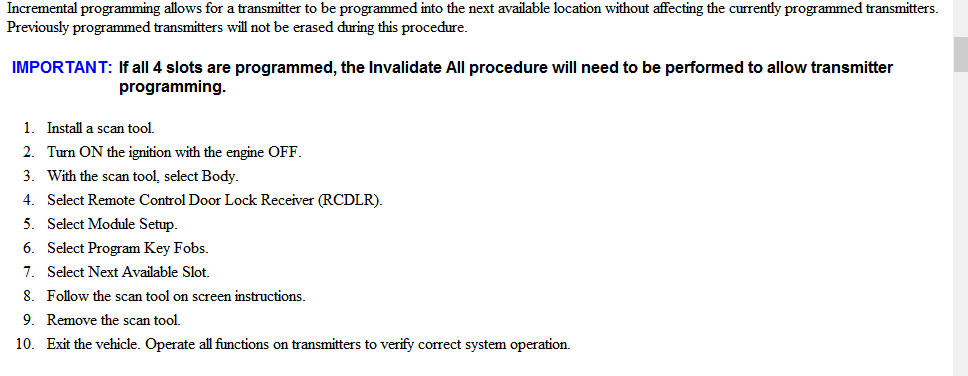
The only thing I can think of is that there were 4 fobs previously programmed and not deleted from memory, so your new one is trying to register as #5. You would need a Tech2 or similar to do that.
You have already done what the "book" says to do.
If you still have your original and it is a repairable problem; battery cage solder, keypad worn, I would try that.

The "low battery" signal is sent when you press a key; the error code sets after it receives the signal 3 consecutive times from the same fob.
There are 3 codes that could be stored in the computer, they don't cause a CEL, just the dash message. B3109,B3110,B3111 or B3112; they are for the 4 possible fobs (109 for #1, 112 for #4).
The only thing I can think of is that there were 4 fobs previously programmed and not deleted from memory, so your new one is trying to register as #5. You would need a Tech2 or similar to do that.
You have already done what the "book" says to do.
If you still have your original and it is a repairable problem; battery cage solder, keypad worn, I would try that.

Thread
Thread Starter
Forum
Replies
Last Post